How to activate your UAN and see your EPF
Activate your UAN to see your PF online
What this is. Your EPF, the Employees’ Provident Fund, is the retirement savings taken from your salary each month and matched by your employer. Your UAN, or Universal Account Number, is the single 12-digit ID that unlocks it online, so you can check your balance and passbook. This guide shows how to activate it.
Heads up: the method changed in 2026. EPFO (the body that runs the EPF) is reported to have moved UAN activation to the UMANG app with Aadhaar face authentication, and the old website route may be retired. The steps below reflect the latest reports, so confirm the current method on the official EPFO portal before you start.
Your UAN is the key to your EPF. Activate it once and you can check your balance, download your passbook, and manage your account online, for free. Here is how to do it.
This is general education, not financial advice. EPFO changes its process from time to time, so always confirm the current steps on the official EPFO portal.
-
Find your UAN
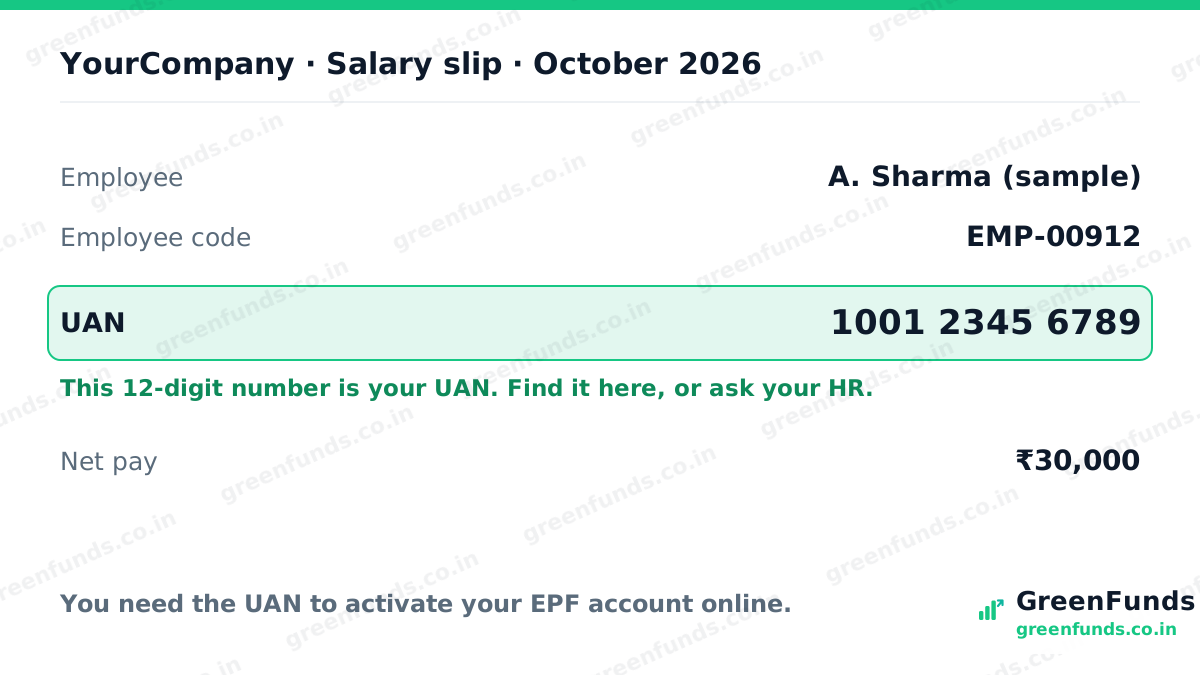
Your UAN is a 12-digit number. It is usually printed on your salary slip, or your employer's HR can give it to you. You need it to activate your account.
-
Open UAN activation in the UMANG app
Install the UMANG app, open EPFO services, and choose UAN activation. EPFO moved activation here in 2026, so if your version looks different, follow the current on-screen flow.
-
Verify with Aadhaar OTP, then your face
Enter your UAN and the mobile number linked to your Aadhaar, verify the OTP, then complete the Aadhaar face scan when prompted. Your name and date of birth must match Aadhaar.
-
Set your password and log in
Create a password when asked, usually at least 8 characters with a capital letter, a number, and a symbol, then log in.
-
Check your passbook and balance
Once activated, you can see your EPF passbook and balance, and later add or update your nominee. Mask your personal details before sharing any screenshot.
Questions people ask
What is a UAN?
UAN is your Universal Account Number, a 12-digit number from EPFO that stays the same across jobs and links all your EPF accounts. You need it to see your PF online.
Where do I find my UAN?
It is usually printed on your salary slip, or your employer's HR can give it to you. It is a 12-digit number.
Can I still activate my UAN on the EPFO website?
EPFO reportedly moved UAN activation to the UMANG app with Aadhaar face authentication in 2026, and the old website route may be retired. Check the official EPFO portal for the current method.
What if my name or date of birth does not match Aadhaar?
A mismatch can cause an authentication error. You may need to correct the details with your employer or EPFO before you can activate.
Source: EPFO. Verify the current activation method on the official EPFO portal.